
Learn the most useful illustration techniques for beginners, including line art, shapes, shading, color, texture, composition, and simple digital methods.
Illustration Techniques for Beginners
Illustration is more than simply drawing a picture.
An illustration communicates an idea, explains something, tells a story, or helps the viewer understand a subject through visual elements. It can be created with pencils, pens, paints, colored pencils, markers, or digital tools.
If you are new to illustration, you do not need to master every technique at once. Start with a few basic skills, practice them regularly, and gradually combine them to create complete illustrations.
In this guide, you will learn some of the most useful illustration techniques for beginners and how to practice them step by step.
What Is an Illustration Technique?
An illustration technique is a method or approach used to create or improve an illustration.
Different techniques can help you:
- Create outlines
- Build shapes
- Add depth
- Show light and shadow
- Apply color
- Create texture
- Organize a composition
- Communicate an idea
- Develop a visual style
There is no single technique that works for every illustration.
The right technique depends on the subject, medium, purpose, and style of the artwork.
If you are completely new to the subject, start with our guide to What Is Illustration? A Beginner’s Guide.
1. Line Art
Line art is one of the most useful starting points for illustration.
It uses lines to define objects, characters, shapes, and important details.
For example, you can use:
- Thin lines for delicate details
- Thick lines for stronger outlines
- Curved lines for organic forms
- Straight lines for structured objects
- Short lines for small details
How to Practice Line Art
Start by drawing simple objects.
Try:
- A cup
- A leaf
- A book
- A simple tree
- A basic cartoon character
Focus on making your lines controlled and intentional.
You can also practice different line weights to make your drawings more expressive.
For more line practice, see Line Drawing Techniques.
2. Shape-Based Illustration
Many illustrations can be built from simple shapes.
You can start with:
- Circles
- Ovals
- Squares
- Rectangles
- Triangles
Then combine these shapes to create more complicated objects.
For example:
Circle + oval → simple face
Rectangle + circle → simple character
Rectangle + triangle → simple house
This approach is especially useful for beginners because it breaks complicated subjects into manageable parts.
Our guide to How to Draw Simple Objects Using Basic Shapes can help you practice this skill.
3. Contour Drawing
Contour drawing focuses on the visible edges and outlines of an object.
Instead of concentrating on details or shading, you focus on following the shape of the subject.
For example, when drawing a leaf, you might first carefully observe and draw:
- Outer edges
- Curves
- Points
- Major internal lines
Contour drawing can improve observation and hand control.
Beginner Exercise
Place a simple object in front of you.
Draw its outer contour slowly without worrying about shading.
Try not to rush.
4. Sketching Before the Final Illustration
A quick sketch can help you plan an illustration before adding details.
A preliminary sketch allows you to experiment with:
- Position
- Size
- Shape
- Character pose
- Object placement
- Composition
Do not worry about making the first sketch perfect.
The purpose of a sketch is to explore the idea.
If you want to improve this skill, see Sketching for Beginners.
5. Proportion
Proportion refers to the size relationship between different parts of an object or subject.
For example, when drawing a character, the head, body, arms, and legs need to relate to each other appropriately for the intended style.
Proportion is also important when illustrating objects.
A cup should not suddenly become larger than a table unless the illustration intentionally uses exaggerated proportions.
Beginner Tip
Before adding details, compare the size of different parts.
Ask:
- Is this part too large?
- Is this part too small?
- Are the objects correctly related to each other?
For more practice, read Proportion in Drawing: How to Get Size and Shape Right.
6. Perspective
Perspective helps create the impression of depth and space.
It becomes particularly useful when illustrating:
- Rooms
- Buildings
- Roads
- Streets
- Landscapes
- Objects viewed from different angles
Beginners can start by understanding simple perspective concepts such as:
- Horizon line
- Vanishing point
- One-point perspective
You do not need advanced perspective skills to create your first illustration.
Start with simple objects and gradually increase the complexity.
7. Light and Shadow
Light and shadow help an illustration appear more three-dimensional.
Without value changes, an object may look flat.
You can use:
- Light areas
- Midtones
- Dark areas
- Cast shadows
to suggest form.
For example, a round object can appear more three-dimensional when one side is lighter and the opposite side is darker.
See Light and Shadow in Drawing for a deeper explanation.
8. Shading
Shading is closely related to light and shadow.
It can help show:
- Form
- Depth
- Surface
- Lighting direction
- Volume
Beginners can start with simple shading methods such as:
- Hatching
- Cross-hatching
- Layered pencil strokes
- Gradual tonal changes
You can learn the basics in Shading Techniques for Beginners.
For more focused practice, see Hatching and Cross-Hatching for Beginners.
9. Color Blocking
Color blocking means placing larger areas of color before adding smaller details.
Instead of immediately working on tiny elements, first establish the major colors.
For example, in a simple landscape illustration you might begin with:
- Blue for the sky
- Green for trees
- Brown for the ground
- A different color for the main object
Once the major color areas are established, you can add details.
This approach can make the illustration easier to organize.
10. Color Mixing
Color mixing is useful when you want to create colors that are not directly available in your paint set.
For example:
- Red + Yellow → Orange
- Yellow + Blue → Green
- Blue + Red → Purple
The exact result depends on the pigments and materials.
Color mixing can help you create more controlled and interesting illustrations.
For practical exercises, read Color Mixing for Beginners.
11. Texture
Texture helps communicate what a surface looks or feels like.
Different textures can suggest:
- Wood
- Stone
- Metal
- Glass
- Fabric
- Grass
- Hair
- Paper
You can create texture using different marks, patterns, colors, and shading.
Simple Texture Exercise
Draw five small boxes.
Fill each box with a different texture.
For example:
- Wood
- Stone
- Grass
- Fabric
- Metal
Do not try to make them extremely detailed.
Focus on creating a visual difference between the surfaces.
12. Pattern and Repeated Marks
Patterns can add visual interest to an illustration.
You can create patterns using:
- Dots
- Lines
- Shapes
- Repeated symbols
- Geometric forms
Patterns are especially useful for:
- Clothing
- Backgrounds
- Decorative objects
- Borders
- Posters
Start with simple repeated shapes before attempting complicated patterns.
13. Negative Space
Negative space is the empty area surrounding or between the main subjects of an illustration.
It is not simply “unused space.”
Negative space can help:
- Separate objects
- Improve readability
- Create balance
- Draw attention to the main subject
When creating an illustration, look not only at the objects but also at the shapes created by the empty areas around them.
14. Composition
Composition refers to how visual elements are arranged within an artwork.
A good composition helps the viewer understand where to look.
Before creating the final illustration, consider:
- Main subject
- Supporting elements
- Background
- Size
- Position
- Empty space
- Visual balance
Beginner Exercise
Create three small thumbnail sketches of the same idea.
Change the position of the main subject in each version.
Compare them before choosing one for the final illustration.
15. Thumbnail Sketching
A thumbnail is a small, quick sketch used to test an idea.
It does not need detailed drawing.
You can create several thumbnails to experiment with:
- Composition
- Character position
- Object placement
- Background
- Size relationships
This is a useful habit because you can solve composition problems before spending time on detailed artwork.
16. Layering
Layering means building an illustration gradually.
A simple workflow might be:
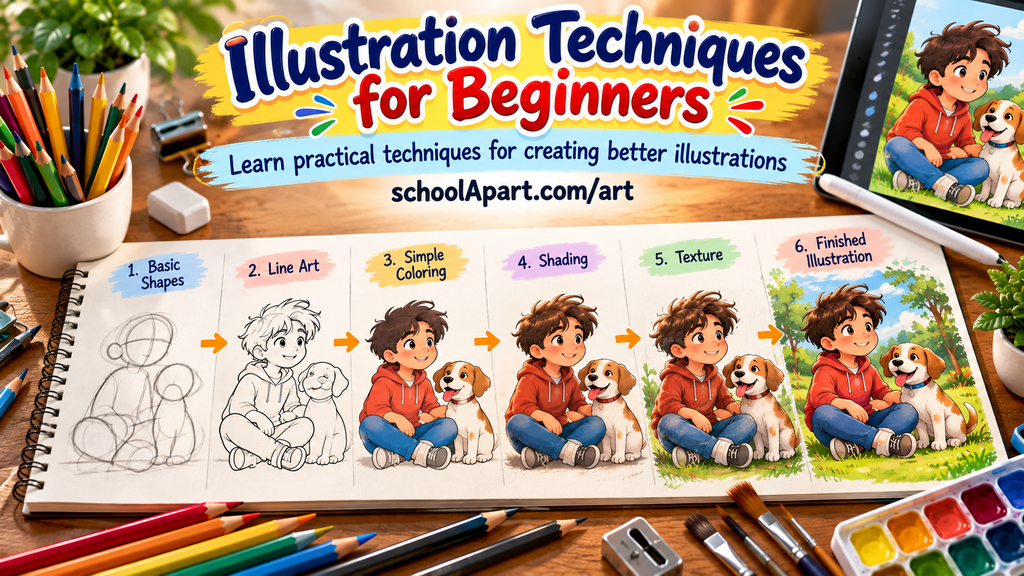
Sketch → Outline → Base Color → Shading → Details
This method can make a complex illustration easier to manage.
Layering can be done traditionally with separate stages of drawing and painting, or digitally using separate layers in an art application.
17. Blending
Blending creates a smoother transition between colors or tones.
It can be useful for:
- Skin tones
- Skies
- Shadows
- Smooth surfaces
- Background gradients
The method depends on the medium.
For example, colored pencils can be blended through layering and pressure control, while digital tools may provide dedicated blending tools.
Do not try to blend everything.
Some illustrations look better with visible strokes and clear edges.
18. Using Different Line Weights
Using the same line thickness everywhere can make an illustration look flat.
Different line weights can create visual hierarchy.
For example:
- Thick lines → main outer forms
- Medium lines → important internal forms
- Thin lines → small details
Try changing pressure or using different drawing tools to create line variation.
19. Simplification
Illustration does not always require realistic detail.
Simplification means reducing a subject to its most important visual elements.
For example, a simple tree illustration might only need:
- Trunk
- Main branches
- Leaf shape
- A few important details
Simplification is especially useful for:
- Educational illustrations
- Children’s illustrations
- Icons
- Posters
- Simple character designs
The goal is not to remove meaning but to make the visual idea easier to understand.
20. Exaggeration
Exaggeration means intentionally changing a feature to make an illustration more expressive.
For example, a cartoon character might have:
- A larger head
- Larger eyes
- Longer arms
- An exaggerated expression
Exaggeration is particularly common in cartoon and character illustration.
However, it works best when the artist understands the basic structure first.
21. Digital Illustration Techniques
Digital illustration uses software or digital devices instead of traditional physical media.
Beginners can explore:
- Digital sketching
- Digital line art
- Layering
- Digital coloring
- Brush selection
- Opacity control
- Basic shading
You do not need advanced software to start learning.
A simple drawing application can be enough for basic practice.
If you are new to the subject, read Digital Art for Beginners.
22. Combining Techniques
The most useful skill is learning how to combine techniques.
For example, a simple illustration might use:
Basic Shapes
↓
Sketching
↓
Line Art
↓
Color Blocking
↓
Shading
↓
Texture
↓
Details
You do not have to use every technique in every artwork.
Choose the techniques that support your subject and purpose.
A Simple Illustration Workflow for Beginners
If you want to create a complete illustration, try this process.
Step 1: Choose an Idea
Start with something simple.
For example:
- A tree
- A house
- A fruit
- A school bag
- A simple character
- A landscape
Step 2: Make a Quick Sketch
Use basic shapes to establish the main forms.
Step 3: Check Proportion
Compare the sizes and positions of the major elements.
Step 4: Improve the Outline
Create cleaner lines around the important forms.
Step 5: Add Base Colors
Place the main colors without worrying about small details.
Step 6: Add Light and Shadow
Use simple shading to create depth.
Step 7: Add Texture
Add only the textures that are useful for the subject.
Step 8: Add Important Details
Focus on details that help communicate the idea.
Step 9: Review the Composition
Look at the complete illustration.
Ask:
- Is the main subject clear?
- Is anything distracting?
- Is there enough empty space?
- Do the colors work together?
Step 10: Make Final Adjustments
Remove unnecessary details and improve the areas that need attention.
Easy Illustration Practice Ideas for Beginners
Try these simple exercises:
Exercise 1: Shape Illustration
Create an object using only circles, rectangles, and triangles.
Exercise 2: Line Variation
Draw the same object three times using different line weights.
Exercise 3: Light and Shadow
Draw one simple object and add a single light source.
Exercise 4: Color Practice
Create an illustration using only three main colors.
Exercise 5: Texture Practice
Draw the same object with three different surface textures.
Exercise 6: Simplified Illustration
Take a real object and reduce it to its most important shapes.
Exercise 7: Thumbnail Practice
Create five tiny compositions for one illustration idea.
Common Illustration Mistakes Beginners Make
Trying to Add Too Much Detail
More detail does not automatically make an illustration better.
Start with the major forms first.
Skipping the Sketch
A quick planning sketch can prevent many proportion and composition problems.
Using Too Many Colors
A limited color palette can often make an illustration easier to control.
Ignoring Light Direction
If different objects appear to receive light from different directions, the illustration may look inconsistent.
Copying Every Detail
Illustration often involves simplifying and communicating an idea rather than reproducing every visible detail.
Choosing Techniques Before Understanding the Subject
First decide what you want to communicate.
Then choose techniques that support that goal.
What Should Beginners Learn First?
You do not need to learn all illustration techniques at once.
A practical learning order is:
Stage 1 — Drawing Basics
- Lines
- Basic shapes
- Simple forms
- Proportion
Stage 2 — Observation
- Contour drawing
- Object sketching
- Light and shadow
Stage 3 — Visual Organization
- Composition
- Negative space
- Thumbnail sketches
Stage 4 — Color
- Color theory
- Color mixing
- Color blocking
- Basic shading
Stage 5 — Illustration
- Simplification
- Texture
- Character forms
- Storytelling
Stage 6 — Digital Exploration
- Digital sketching
- Layers
- Digital coloring
- Digital brushes
This gradual approach makes illustration easier to learn.
Final Thoughts
Illustration is a combination of observation, drawing, design, color, and visual communication.
You do not need to master every technique before creating your first illustration.
Start with lines, shapes, sketching, proportion, and simple composition. Then gradually add color, shading, texture, and other techniques.
The most important thing is to practice regularly and experiment with different approaches.
As your skills develop, you will discover which techniques work best for the kind of illustrations you enjoy creating.
Quick Reference: Illustration Techniques
| Technique | Main Purpose |
|---|---|
| Line Art | Define forms and details |
| Shape-Based Drawing | Build objects from simple forms |
| Contour Drawing | Improve observation |
| Sketching | Plan an illustration |
| Proportion | Control size relationships |
| Perspective | Create depth |
| Light & Shadow | Show form and volume |
| Shading | Add tonal depth |
| Color Blocking | Establish major colors |
| Color Mixing | Create new color variations |
| Texture | Show surface qualities |
| Pattern | Add repeated visual elements |
| Negative Space | Improve balance and readability |
| Composition | Organize visual elements |
| Thumbnail Sketching | Test ideas quickly |
| Layering | Build artwork gradually |
| Blending | Create smooth transitions |
| Simplification | Communicate ideas clearly |
| Exaggeration | Add expression |
| Digital Techniques | Create artwork digitally |
FAQ
1. What are illustration techniques?
Illustration techniques are methods used to create, develop, and improve illustrations, such as line art, sketching, shading, coloring, texture, and composition.
2. What is the easiest illustration technique for beginners?
Starting with simple shapes and line art is often a practical way for beginners to understand illustration.
3. Do I need to know drawing before learning illustration?
Basic drawing skills are helpful, but beginners can learn illustration gradually by practicing simple shapes, lines, observation, and composition.
4. What are the basic techniques of illustration?
Basic techniques include line art, sketching, shape construction, proportion, perspective, shading, color, texture, and composition.
5. What is line art in illustration?
Line art uses lines to define objects, characters, forms, and details without relying heavily on color or shading.
6. Why are basic shapes useful in illustration?
Basic shapes help artists simplify complicated subjects and construct objects or characters more easily.
7. What is color blocking in illustration?
Color blocking means establishing large areas of main colors before adding smaller details.
8. Why is composition important in illustration?
Composition determines how visual elements are arranged and helps guide the viewer’s attention.
9. What is negative space in illustration?
Negative space is the empty area around or between the main elements of an illustration.
10. What is thumbnail sketching?
Thumbnail sketching involves making small, quick sketches to test composition and ideas before creating the final artwork.
11. How can beginners practice illustration?
Beginners can practice simple objects, shape-based drawings, line art, textures, color exercises, and small illustration projects.
12. Can illustration be done with pencil?
Yes. Pencil is a useful traditional medium for sketching and creating illustrations.
13. Can beginners learn digital illustration?
Yes. Beginners can start digital illustration with simple drawing applications and gradually learn layers, brushes, coloring, and digital shading.
14. What is simplification in illustration?
Simplification means reducing a subject to its most important visual elements while keeping the main idea clear.
15. What should I learn first in illustration?
Start with lines, basic shapes, sketching, proportion, observation, and simple composition before moving to more advanced techniques.
Leave a Reply